Introduction
Automation is one of the first things engineers look for. Setting up dev environments, onboarding new customers, running CI/CD pipelines, etc. If a task is repetitive and rule-based, it’s a candidate for automation. Now with AI, there are more opportunities for automation. Architecture diagrams are one of them.
With architecture, the challenge isn’t solely generating diagrams. It’s capturing the architectural decisions underneath them and keeping diagrams in sync with the model those decisions shape. In this post, we’ll walk through how to do it in IcePanel, including a hands-on example using Claude Code.
Why do we need to automate?
Doing a repetitive task manually is an opportunity cost on an engineering resource. It takes time and energy to go through repeatable steps. For example, a typical CI/CD pipeline for a service includes unit/integration tests, build, and deployment as the main stages. Running them automatically in a PR merge to main/master is a win for engineering efficiency.
The same applies to software architecture. If an engineer makes an architectural decision in a system X, like designing a new RESTful service backed by an S3 bucket, this should be automatically reflected in all diagrams belonging to that system X. You don’t want that engineer to go through every diagram or documentation to include that decision.
There has to be automation to keep architecture diagrams in sync with what’s running in production. Different audiences wanting to see a specific data flow (like onboarding a new customer) need explanations from architects to trace the services involved. That’s manual effort.
Engineers know the pain (and dislike) of mechanical work. That’s why they lean on in-house or third-party tools to automate the stuff they shouldn’t have to think about. All they care about is having their verified code running in production. The same applies to architecture diagrams, except that the direct customers are engineering themselves, along with other stakeholders who depend on a clear picture of the system.
Infrastructure-as-code (IaC) is the closest parallel. An engineer can run a script, and a complete infrastructure is provisioned in the cloud, such as AWS, without manually configuring services like VPC networking, scalability, storage, etc.
Architecture diagrams should work the same way: the model is the source, and the diagrams are outputs that stay in sync as the model changes.
The importance of the model
Think of the model as the kernel of software architecture. A diagram is one view of it, generated for one audience. The systems, components, dependencies, and data flows all live inside the model. It is the source of truth describing your whole system across the C4 layers, from Systems, down to Containers, Components, and Code.
Diagrams are outputs of that model. Update the model, and every view drawing from it stays current rather than drifting the moment someone ships a change. In IcePanel, we have the model viewer: an automatic view of all objects and connections in your landscape. Whenever we introduce a new change to the model, the model viewer reflects that.
Quick note: creating new diagrams directly from the model viewer is coming soon; for now, it’s read-only.
With the model and the model viewer, AI fits here well. An LLM doesn’t need your diagrams to understand your architecture, it needs the model. With a tool like Claude Code, you can inject the context through IcePanel’s MCP server, and it reasons over the model and produces better outputs. Like explaining objects inside the model, highlighting missing connections between objects, and so on.
Workflow
A suggested flow for architects looks like this:

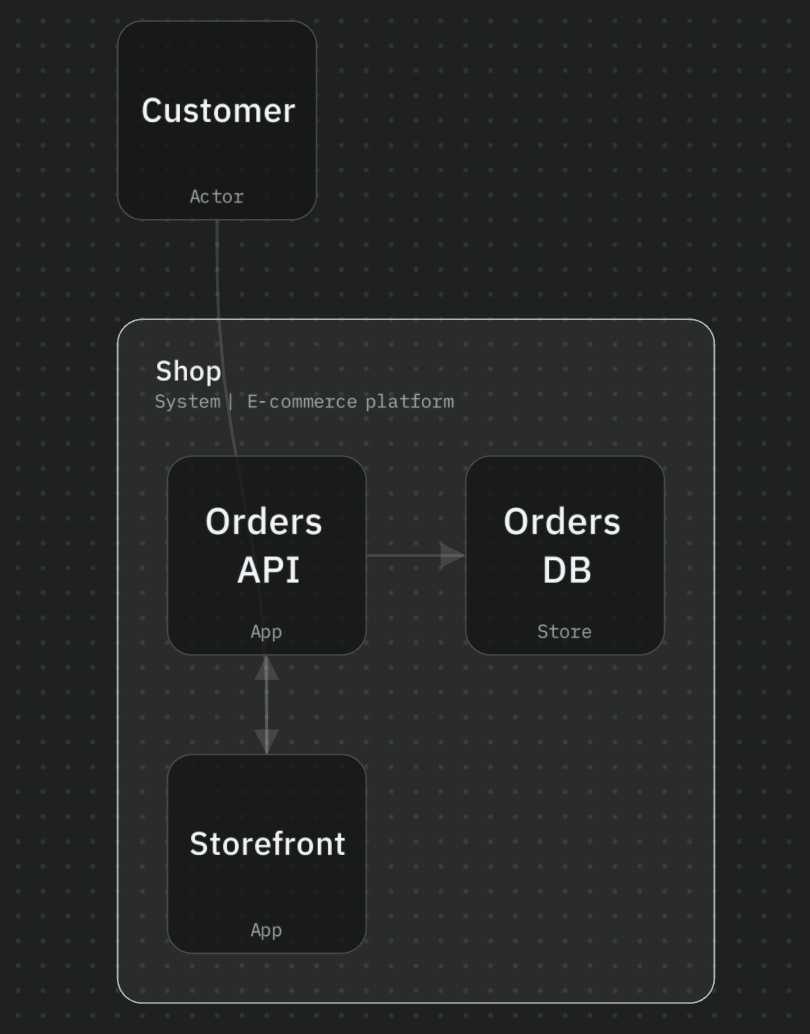
To make this concrete, let’s take an e-commerce example: a Storefront that customers browse, an Orders API behind it backed with a Postgres database.
With IcePanel’s MCP, you can connect it to AI tools like Claude Code.

This provides read access to the agent where it can list landscapes, objects, relationships, and answer questions about the architecture. The agent can also draft new changes to the model, like adding the Orders API to Storefront. The model is described in JSON or YAML format and can be modified by the agent as code. Both MCP and the API/SDK support write operations, so you can push changes through either depending on your workflow.
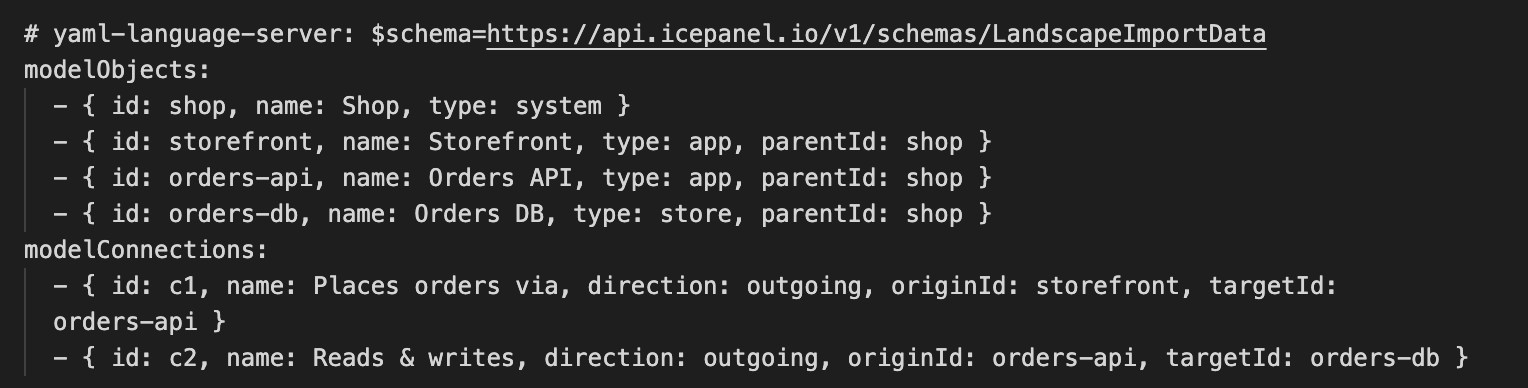
This file can be synced with the current model through IcePanel’s API/SDK. A common use case is adding a CI/CD job that syncs any changes to the model in a git repository.
Once the Storefront model is updated, the model viewer gives you an automatic, current view of how the Storefront, Orders API, and database connect.
By putting it together, AI builds the model from your product spec, CI pushes it to IcePanel on every change, and your model is version-controlled and viewable in the model viewer.
For a demo on IcePanel MCP, check out https://docs.icepanel.io/integrations/mcp-server
We also have a how-to guide on generating models using LLMs here.
Governance
Automation that only generates diagrams is half the solution. The other half is verification.
When you build your model for an architecture, you want to hold the current design accountable to decisions you and your team made. Architecture Decision Records (ADRs) capture the why alongside the constraints and trade-offs, for future reference. We covered this in our previous post, adopting ADRs in enterprise.
This matters more in an AI workflow. LLMs are only as good as the context they’re given, and ADRs are exactly the kind of context that’s otherwise invisible. Your model shows what was built; your ADRs hold the why. When you’re about to point an agent at part of your system, those captured decisions are what stop it from confidently reintroducing a problem you already solved. For example, an ADR highlighting why PostgreSQL was chosen as the primary database provides clarity to both your engineering and AI agents!
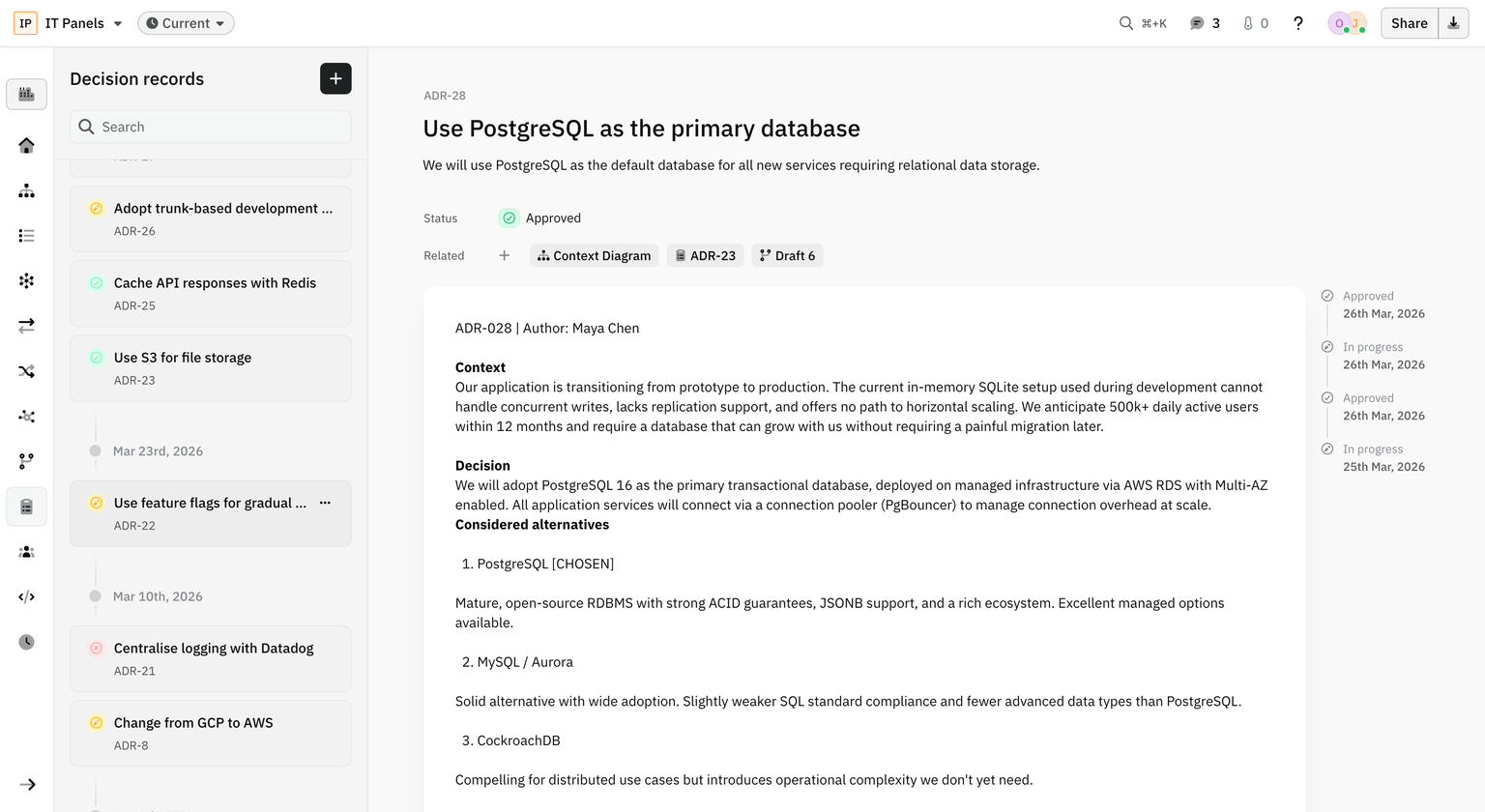
In IcePanel, ADRs carry a status (in progress, approved, rejected) and can be linked to the diagrams, drafts, and other records they relate to. And because IcePanel exposes both your model and your decision records over MCP, an agent can check one against the other. Ask it, “does this architecture reflect our decision records?” and it can flag any inconsistency with the architecture. The agent surfaces the inconsistencies, and you decide whether it’s a violation to fix or a decision worth revisiting. That’s governance that checks designs against ADRs.
Conclusion
Automating your model is what keeps your software architecture reliable at scale. Update the model through IcePanel’s API/SDK, and you can wire it into a CI/CD pipeline, so changes in your repo flow straight through. Connect the MCP server with AI tools like Claude Code to explore that model, suggest changes, and edit the architecture as code. ADRs capture the decisions behind them, which gives the agent the context it needs to reason well. Put those pieces together, and you’ve built an automation for your architecture diagrams!
📚 Resources
- https://docs.icepanel.io/core-features/decision-records
- https://docs.icepanel.io/core-features/model-viewer
- https://docs.icepanel.io/integrations/mcp-server
- https://docs.icepanel.io/integrations/rest-api
- https://icepanel.io/blog/2026-05-05-adopting-adrs-in-enterprise
- https://icepanel.io/blog/2026-03-11-new-model-as-code-import-json-yaml
- https://api.icepanel.io/v1/schemas/LandscapeImportData
- https://claude.com/product/claude-code